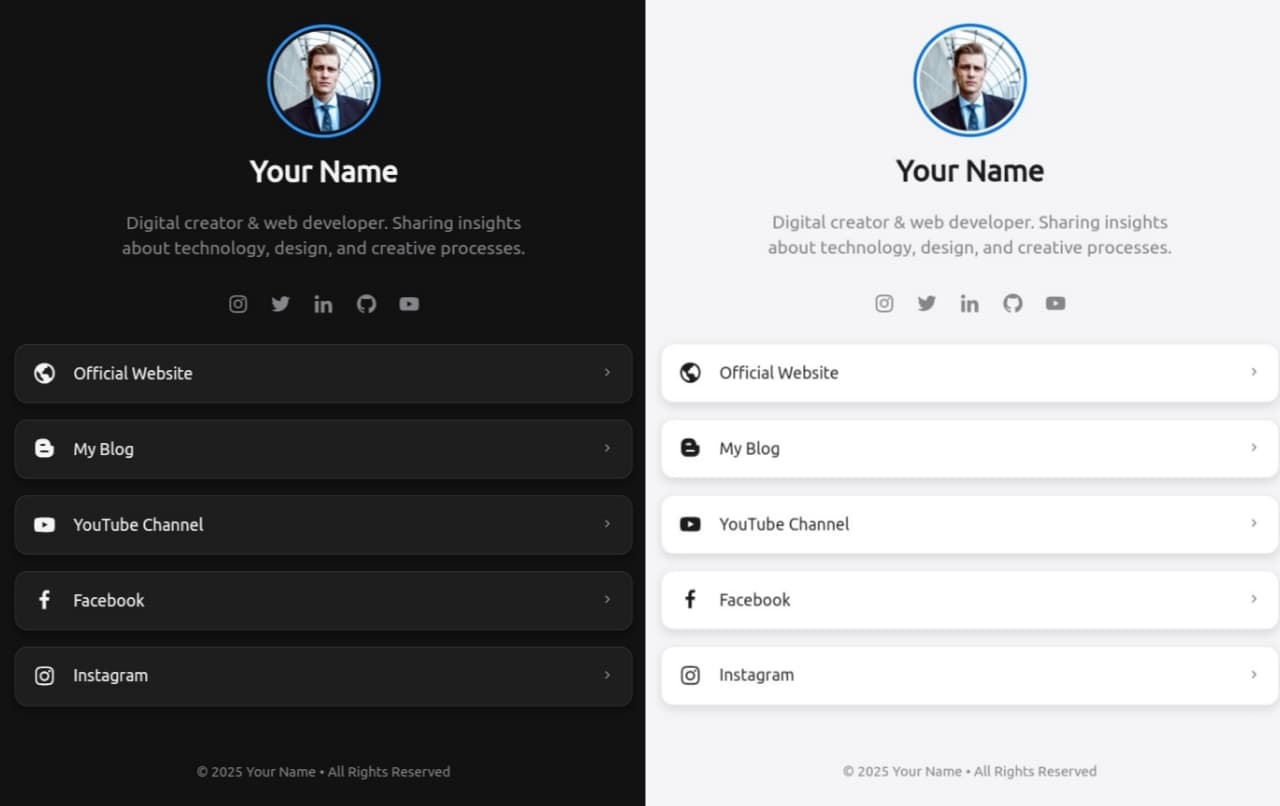
Di era digital saat ini, memiliki halaman bio link sangatlah penting untuk menampung semua tautan.
Project kali ini adalah halaman link bio minimalis yang saya buat menggunakan HTML, CSS, dan sedikit JavaScript, tanpa bantuan framework atau library modern.
# Fitur
- Desain gelap yang elegan dan responsif
- Gambar profil dengan nama dan deskripsi singkat
- Ikon sosial media
- Link ke berbagai platform (website, blog, YouTube, dll)
- Struktur HTML yang clean dan semantic
- Sedikit interaksi dengan JavaScript (jika dibutuhkan)
# Struktur HTML
Berikut adalah struktur dasar dari halaman:
html <!doctype html> <html lang="en"> <head> <meta charset="UTF-8" /> <meta name="viewport" content="width=device-width, initial-scale=1.0" /> <title>Bio Links | Your Name</title> <link rel="stylesheet" href="./style.css" /> <link href="https://unpkg.com/boxicons@2.1.4/css/boxicons.min.css" rel="stylesheet" /> </head> <body> <button class="theme-toggle" id="themeToggle"> <i class="bx bxs-moon" id="themeIcon"></i> </button> <div class="container"> <div class="profile"> <img src="https://i.ibb.co.com/Kcp1JJCB/20250429-230919.jpg" alt="Profile Picture" class="profile-image" /> <h1 class="profile-name">Your Name</h1> <p class="profile-bio"> Digital creator & web developer. Sharing insights about technology, design, and creative processes. </p> <div class="social-icons"> <a href="#" class="social-icon"><i class="bx bxl-instagram"></i></a> <a href="#" class="social-icon"><i class="bx bxl-twitter"></i></a> <a href="#" class="social-icon"><i class="bx bxl-linkedin"></i></a> <a href="#" class="social-icon"><i class="bx bxl-github"></i></a> <a href="#" class="social-icon"><i class="bx bxl-youtube"></i></a> </div> </div> <div class="links"> <a href="#" class="link-card"> <div class="link-icon"><i class="bx bx-world"></i></div> <div class="link-text">Official Website</div> <div class="link-arrow"><i class="bx bx-chevron-right"></i></div> </a> <a href="#" class="link-card"> <div class="link-icon"><i class="bx bxl-blogger"></i></div> <div class="link-text">My Blog</div> <div class="link-arrow"><i class="bx bx-chevron-right"></i></div> </a> <a href="#" class="link-card"> <div class="link-icon"><i class="bx bxl-youtube"></i></div> <div class="link-text">YouTube Channel</div> <div class="link-arrow"><i class="bx bx-chevron-right"></i></div> </a> <a href="#" class="link-card"> <div class="link-icon"><i class="bx bxl-facebook"></i></div> <div class="link-text">Facebook</div> <div class="link-arrow"><i class="bx bx-chevron-right"></i></div> </a> <a href="#" class="link-card"> <div class="link-icon"><i class="bx bxl-instagram"></i></div> <div class="link-text">Instagram</div> <div class="link-arrow"><i class="bx bx-chevron-right"></i></div> </a> </div> <div class="footer"> © <span id="currentYear"></span> Your Name • All Rights Reserved </div> </div> <script src="./script.js" type="text/javascript"></script> </body> </html>
# CSS Styling
Tampilan didesain agar terlihat modern dan tetap ringan. Berikut contoh potongan CSSnya
css :root { --bg-color: #f5f5f7; --text-color: #1d1d1f; --card-bg: #ffffff; --card-shadow: rgba(0, 0, 0, 0.1); --accent-color: #0071e3; --secondary-color: #86868b; --hover-color: #efefef; --border-color: #e6e6e6; } [data-theme="dark"] { --bg-color: #121212; --text-color: #f5f5f7; --card-bg: #1e1e1e; --card-shadow: rgba(0, 0, 0, 0.3); --accent-color: #2997ff; --secondary-color: #86868b; --hover-color: #2c2c2e; --border-color: #3a3a3c; } * { margin: 0; padding: 0; box-sizing: border-box; font-family: -apple-system, BlinkMacSystemFont, "Segoe UI", Roboto, Oxygen, Ubuntu, Cantarell, "Open Sans", "Helvetica Neue", sans-serif; transition: background-color 0.3s ease, color 0.3s ease, border-color 0.3s ease, box-shadow 0.3s ease; } body { background-color: var(--bg-color); color: var(--text-color); display: flex; flex-direction: column; align-items: center; min-height: 100vh; padding: 2rem 1rem; } .container { max-width: 600px; width: 100%; display: flex; flex-direction: column; align-items: center; gap: 1.5rem; } .profile { display: flex; flex-direction: column; align-items: center; gap: 1rem; } .profile-image { width: 110px; height: 110px; border-radius: 50%; object-fit: cover; border: 3px solid var(--accent-color); padding: 3px; } .profile-name { font-size: 1.8rem; font-weight: 700; margin-bottom: 0.3rem; } .profile-bio { text-align: center; max-width: 400px; color: var(--secondary-color); font-size: 1rem; line-height: 1.4; } .links { display: flex; flex-direction: column; gap: 1rem; width: 100%; } .link-card { background-color: var(--card-bg); padding: 1rem; border-radius: 12px; width: 100%; text-decoration: none; color: var(--text-color); display: flex; align-items: center; gap: 1rem; box-shadow: 0 4px 8px var(--card-shadow); border: 1px solid var(--border-color); transition: transform 0.2s ease, box-shadow 0.2s ease; } .link-card:hover { transform: translateY(-2px); box-shadow: 0 6px 12px var(--card-shadow); background-color: var(--hover-color); } .link-icon { font-size: 1.5rem; width: 24px; height: 24px; display: flex; align-items: center; justify-content: center; } .link-text { font-weight: 500; flex: 1; } .link-arrow { color: var(--secondary-color); } .social-icons { display: flex; gap: 1.2rem; margin-top: 1rem; } .social-icon { font-size: 1.4rem; color: var(--secondary-color); text-decoration: none; transition: color 0.2s ease, transform 0.2s ease; } .social-icon:hover { color: var(--accent-color); transform: scale(1.1); } .theme-toggle { position: fixed; top: 20px; right: 20px; background-color: var(--card-bg); border: 1px solid var(--border-color); color: var(--text-color); border-radius: 50%; width: 40px; height: 40px; display: flex; align-items: center; justify-content: center; cursor: pointer; box-shadow: 0 2px 5px var(--card-shadow); z-index: 100; } .theme-toggle:hover { background-color: var(--hover-color); } .footer { margin-top: 2rem; color: var(--secondary-color); font-size: 0.85rem; text-align: center; } @media (max-width: 600px) { .container { padding: 0 0.5rem; } .profile-image { width: 90px; height: 90px; } .profile-name { font-size: 1.5rem; } }
# JavaScript
Pada project ini, JavaScript digunakan untuk menambahkan interaktif yang meningkatkan UX
- Menampilkan tahun saat ini secara otomatis pada bagian footer
- Fitur toggle dark/light theme
- Mengikuti preferensi tema sistem pengguna
- Menyimpan preferensi tema di local storage
Berikut potongan kodenya
javascript // Set current year in footer document.getElementById("currentYear").textContent = new Date().getFullYear(); // Theme toggle functionality const themeToggleBtn = document.getElementById("themeToggle"); const themeIcon = document.getElementById("themeIcon"); // Check for saved theme preference or use system preference const savedTheme = localStorage.getItem("theme"); const systemPrefersDark = window.matchMedia( "(prefers-color-scheme: dark)", ).matches; // Set initial theme based on saved preference or system preference if (savedTheme === "dark" || (!savedTheme && systemPrefersDark)) { document.documentElement.setAttribute("data-theme", "dark"); themeIcon.classList.replace("bxs-moon", "bxs-sun"); } else { document.documentElement.setAttribute("data-theme", "light"); themeIcon.classList.replace("bxs-sun", "bxs-moon"); } // Toggle theme function function toggleTheme() { const currentTheme = document.documentElement.getAttribute("data-theme"); const newTheme = currentTheme === "dark" ? "light" : "dark"; // Update theme attribute document.documentElement.setAttribute("data-theme", newTheme); // Update icon if (newTheme === "dark") { themeIcon.classList.replace("bxs-moon", "bxs-sun"); } else { themeIcon.classList.replace("bxs-sun", "bxs-moon"); } // Save preference localStorage.setItem("theme", newTheme); } // Event listener for theme toggle button themeToggleBtn.addEventListener("click", toggleTheme); // Listen to system theme changes window .matchMedia("(prefers-color-scheme: dark)") .addEventListener("change", (e) => { if (!localStorage.getItem("theme")) { const newTheme = e.matches ? "dark" : "light"; document.documentElement.setAttribute("data-theme", newTheme); themeIcon.className = e.matches ? "bx bxs-sun" : "bx bxs-moon"; } });
# Kesimpulam
Project ini cocok untuk lu yang ingin memiliki web bio link sendiri, atau ingin belajar web development dari dasar tanpa bergantung dengan framework.
Komunitas
Jika lu tertarik ingin belajar lebih dalam lagi, lu bisa gabung komunitas gua bro